Our Office 365 email is subject to Microsoft’s Exchange Online Protection (EOP), a cloud-based mail filtering service that helps protect against spam and malware.
EOP filters out messages sent to your email account that look like junk mail. Every day you will receive notification from quarantine@messaging.microsoft.com of any messages that have been blocked in the spam quarantine.
You should take these Spam Notifications seriously as they provide the means by which you can manage your quarantined messages. The notifications give you the option of moving the incriminated messages to your Inbox (”Release to Inbox”) and/or reporting them as “Not Junk”, in which case they will also be sent to the Microsoft Spam Analysis Team.
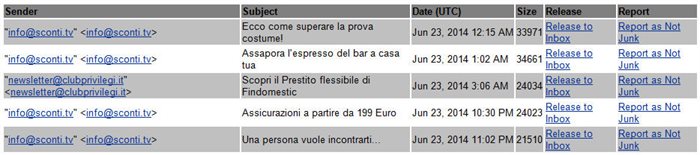
Please Note : Due to an incompatibility issue, on Mac with Safari as default browser, clicking either of these options may result in a 403 Forbidden Access error. This problem can be solved by installing Firefox or Google Chrome and setting it as default browser. Otherwise, the 403 error can simply be disregarded, as the requested action is apparently applied in spite of the browser error.
You can also access your spam-quarantined messages directly, by specifyng in a web browser the URL https://protection.office.com/#/quarantine. On the sign-in page, enter your Office 365 email address and password. After you’ve signed in and been authenticated, you’ll be directed to the end-user spam quarantine. Here too you can release a message and/or report it as not junk to the Microsoft Spam Analysis Team. In the spam quarantine user interface you can see messages going back 15 days.
For further details about the spam quarantine and how to use it, see the Microsoft TechNet page "Find and release quarantined messages as an end user".
Remember too that Outlook offers you the possibility to Report as Junk any spam messages that do reach your Inbox. The EOP "learns" from user responses, so the more often you declare delivered messages to be Junk (false negatives) and quarantined messages as "Not Junk" (false positives), the more accurate the system becomes in detecting real spam.
Page last updated on 29 August 2018